

Entries, categories, entry fees
Open a competition and you see who is entered, in which category, who has paid — and how many trainings each of them has left before the day.
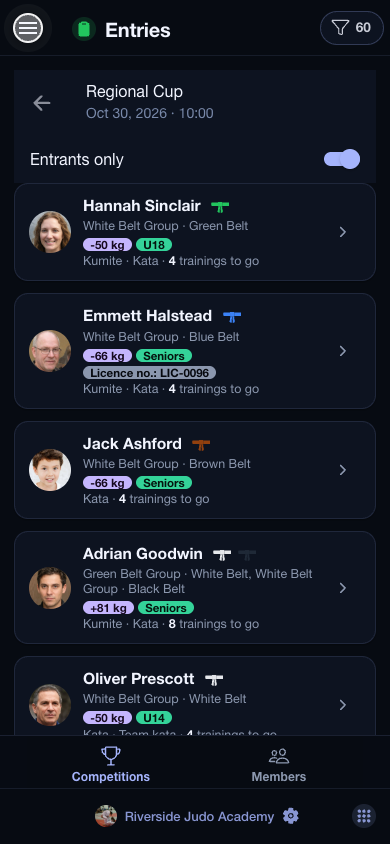
The app in use, recorded.
The Entries page lists the club’s upcoming competitions: where they are, how many members are entered, and how many of them have paid. Open one and you get its entrants as a member list — every card with the categories the member fights in, and in bold how many trainings they still have before the competition, counted from their groups’ timetables.
One dialog per member
Tap a member and tick the disciplines they enter. The category is picked for them from their age and weight — U18, −50 kg — and you can move them to another at any time; a member who fits no category is flagged instead of being dropped. Every entry carries its own fee and a switch for whether it is paid, and the total due is at the bottom of the dialog.
Categories the way the federation counts them
In the competition’s editor, every discipline has its own card: the entry fee, the minimum ranking points it asks for, and its categories. You do not have to type them: tick the age groups and weight groups and the app builds every pair, offering only the weight ladder that belongs to the age class. A discipline knows whether it is weighed and which sexes compete in it.
Ranking points
A ranked competition awards points by placement, and they land on the member’s profile by federation and discipline, with the total in the corner. A discipline that asks for points turns away whoever does not have them yet — with a line saying how many are missing.
Smoothcomp
If your federation runs its competitions on Smoothcomp, paste the event’s address into the competition and one tap brings over its name, date, venue, organiser and disciplines. The entrants’ registrations are listed by category, a registration mail goes out from the member’s dialog, and on the day the Live page shows every mat’s current and next fight, with your members marked.